

Date: (28 Jul, 2026)
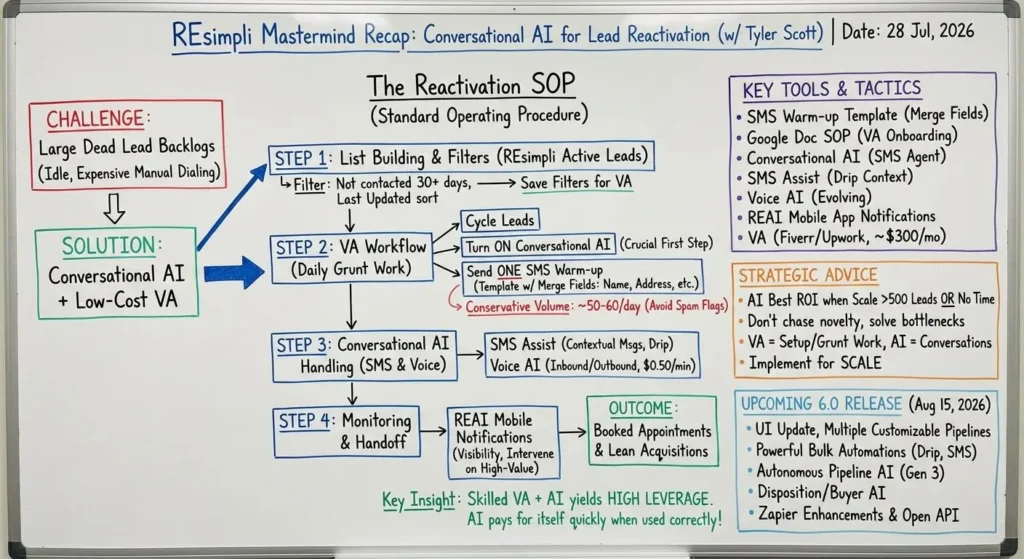
Yesterday we hosted our weekly REsimpli Mastermind session with Tyler Scott, who walked through his SOP for using conversational AI to reactivate old leads, book more appointments, and run a lean acquisitions operation. Below is a recap of the major topics discussed.
Topic: 6.0 Release & Open API
Challenge: Large lead backlogs (years of uncontacted leads) sit idle because dialing through them manually is time-consuming and expensive.
Advice:
Build a repeatable process: filter active leads for those not contacted in 30+ days, turn on conversational AI on each lead, send one warm-up SMS, and let the AI handle inbound replies and appointment-setting. Keep daily outbound SMS volume conservative (about 50–60/day) to avoid spam flags. Have a VA handle the repetitive job of cycling through leads and turning AI on.
Key Insight:
Conversational AI plus a low-cost VA can surface appointments from old databases far cheaper than hiring full-time dialers.
Topic: List Building, Filters & System Setup in REsimpli
Challenge: Leads are often mis-dispositioned (warm leads placed in “dead” buckets) and teams lack consistent follow-up cadence.
Advice:
Create filters in Active Leads (filter by last updated, lead status, exclude under contract/referred to agent if desired), use List View sorted by last updated to find stale records, save filters for daily VA workflows. Include “dead” leads in your review if your team historically misused the disposition.
Key Insight:
Proper filtering + regular, automated touches will convert many leads labeled “dead” into opportunities.
Topic: SMS Warm-Up Template & Workflow
Challenge: Sending individualized texts manually is inefficient and inconsistent.
Advice:
Use an SMS template with merge fields (lead name, property address, rep name, company) and a simple warm-up message: e.g., “Hey [Name], this is [Rep] from [Company]. Just wanted to see if you’d consider selling [Address]. If not, totally fine — just checking in.” Always turn conversational AI on before sending the text so inbound replies are handled automatically.
Key Insight:
One short, consistent warm-up text + AI follow-up captures responses while minimizing manual work.
Topic: SMS Assist (Contextual Message Generation)
Challenge: Writing follow-up copy for many leads and drip steps is time consuming and often generic.
Advice:
Use SMS Assist to generate context-aware messages based on the lead’s notes, conversation history, and custom fields. SMS Assist is especially powerful when used inside drip campaigns — it can create the “next best message” at each cadence step.
Key Insight:
SMS Assist reduces copywriting overhead and keeps follow-ups relevant without manual editing.
Topic: Monitoring AI Conversations & Notifications
Challenge: Teams want visibility into AI-seller conversations without micromanaging every message.
Advice:
Enable REAI notifications in REsimpli mobile app to get alerts for every message sent/received by the AI. Monitor back-and-forth and jump in when needed. Expect to tune notification settings to avoid overload.
Key Insight:
You can let AI run most conversations but still keep oversight and intervene on high-value threads.
Topic: Voice AI & Ongoing Voice Improvements
Challenge: Voice agent edge cases (e.g., offer logging mistakes, appointment set issues) surface as more users adopt voice AI.
Advice:
Tyler noted frequent bi-weekly voice updates to address small issues and expand behaviors. Voice AI can be used as an outbound speed-to-lead agent or inbound call handler. Voice pricing is per-minute (around $0.50/minute).
Key Insight:
Voice AI is evolving quickly—expect regular updates, and test flows for your call expectations.
Topic: Hiring & Using a VA to Scale Operations
Challenge: Manual repetitive tasks (list pulling, messaging, posting, KPI reports) eat operator time.
Advice:
Hire a VA (Tyler found his via Fiverr; Upwork also works). Train them to send daily warm-up texts (≈50/day), turn on conversational AI, monitor inbound responses, list build/stack, post to buyer lists, and send KPI reports. Example pricing: a competent VA handling these tasks can run ~$300–$350/month.
Key Insight:
A skilled VA plus AI yields high leverage — they do the setup and grunt work while AI handles conversations.
Topic: When AI Makes Sense for Your Business
Challenge: Investors debate when to pay for AI features.
Advice:
AI provides the best ROI when you have lots of leads (Tyler’s rule of thumb: 500+ leads) or you lack time to do follow-up. If AI nets one extra deal/month it typically pays for itself many times over.
Key Insight:
Don’t chase AI for novelty — use it when scale or bandwidth makes follow-up the bottleneck.
Topic: Upcoming 6.0 Release (Date: Aug 15, 2026) & Roadmap Highlights
Challenge: Current limitations in customization, pipelines, and bulk automations.
Advice / What to Expect:
- UI update and more customization.
- Multiple pipelines and customizable stages per pipeline.
- Powerful automations (bulk drip campaigns based on last contact >30 days, incoming intent-based automations like auto-move to dead on “remove me”).
- Bulk SMS/drip capabilities to put many leads on an automation at once.
- Post-6.0: autonomous pipeline AI (Gen 3) and disposition/dispo AI for buyer matching, calling buyers, and automating dispo workflows.
- Zapier enhancements and an open API planned for wider integrations.
Key Insight:
6.0 unlocks bulk automation and pipeline customization that will dramatically reduce manual setup and enable buyer-seller matching and more autonomous workflows.
Topic: Troubleshooting & Support Escalation Best Practices
Challenge: Slow support resolution and issues when integrating custom web forms or external systems.
Advice:
If support tickets lag, request a different account manager; REsimpli support is strongest on native forms (custom form integrations sometimes require dev attention). Tyler recommended using REsimpli’s web form when possible to avoid integration headaches. For escalations, request another rep and submit feature/bug reports via “Request a Feature” in the app (bottom-left).
Key Insight:
Native components reduce friction; escalate account manager if tickets bog down.
Tools & Tactics Mentioned
- SMS warm-up template (merge fields: name, company, rep, address)
- Google Doc SOP for VA onboarding (Tyler to share template)
- Conversational AI (SMS agent) — turn on before sending warm-up text
- SMS Assist (contextual message generator for leads and drip campaigns)
- Voice AI (inbound/outbound voice agents; $0.50/minute)
- REAI mobile notifications for monitoring AI conversations
- Filters & List View sorted by Last Updated (find stale leads)
- VA (found via Fiverr/Upwork) to handle SMS ops, list building, posting, KPI reports
- Drip campaigns & upcoming bulk automations in 6.0
- Zapier integrations and an open API planned
- Buyer/seller AI fields and future buyer-matching/dispo AI
Best Advice from the Session
- Turn conversational AI on before sending a warm-up SMS; let AI handle inbound replies and appointment-setting.
- Keep daily warm texts conservative (≈50/day) to avoid flags and to manage inbound responses.
- Use SMS Assist inside drip campaigns to auto-generate relevant follow-ups.
- Hire a VA for repetitive setup and let AI do the conversational heavy lifting — a small VA budget often unlocks big results.
- Don’t buy AI just to have it; implement it when you have scale (many leads) or bandwidth constraints. When used correctly, AI pays for itself quickly.
- Prepare for 6.0 (Aug 15): bulk automations, multiple pipelines, and deeper automations will make these workflows much easier and more powerful.
If you want the exact SOP and SMS template Tyler shared, he posted a Google Doc during the session that includes step-by-step filters, the SMS warm-up text, and VA task lists.